


How AE7 Is Rewiring Lighting Design Workflows with AI—Without Losing Design Authorship
Artificial intelligence is no longer a side experiment in lighting design. At Light + Intelligent Building Middle East, a standing-room-only workshop made that point unmistakably clear. I had the pleasure of introducing Faraz Izhar and Anthony Girgis of AE7 before they presented The AI Shift: Lighting Design Workflows in the Age of Intelligent Tools, walking the audience through how their firm is integrating AI across visualization, documentation, and compliance—not as a replacement for designers, but as a force multiplier.
What distinguished the session was its refusal to stay theoretical. Instead, Izhar and Girgis opened their actual workflows, showing how AI tools are being trained, constrained, audited, and deployed in production projects today. The message was consistent throughout: AI accelerates exploration and documentation; humans retain authorship, judgment, and accountability.
Why Lighting Design Is Uniquely Suited to AI
Lighting design sits at an unusual intersection. It is simultaneously emotional and technical, poetic and regulated. According to Izhar, and to my surprise, this makes it especially compatible with AI assistance.
On one side are immersive qualities—atmosphere, hierarchy, rhythm, drama, and material response. On the other are non-negotiables: glare limits, power density, controls logic, energy codes, Dark Sky compliance, and maintainability. AI thrives when those domains are clearly separated.
The AE7 approach draws a hard line: AI accelerates ideation, visualization, drafting, and checking. Designers validate performance, ensure compliance, and protect intent. Accountability never leaves the human.
The Core Workflow: Intent → Visualization → Validation → Deliverables
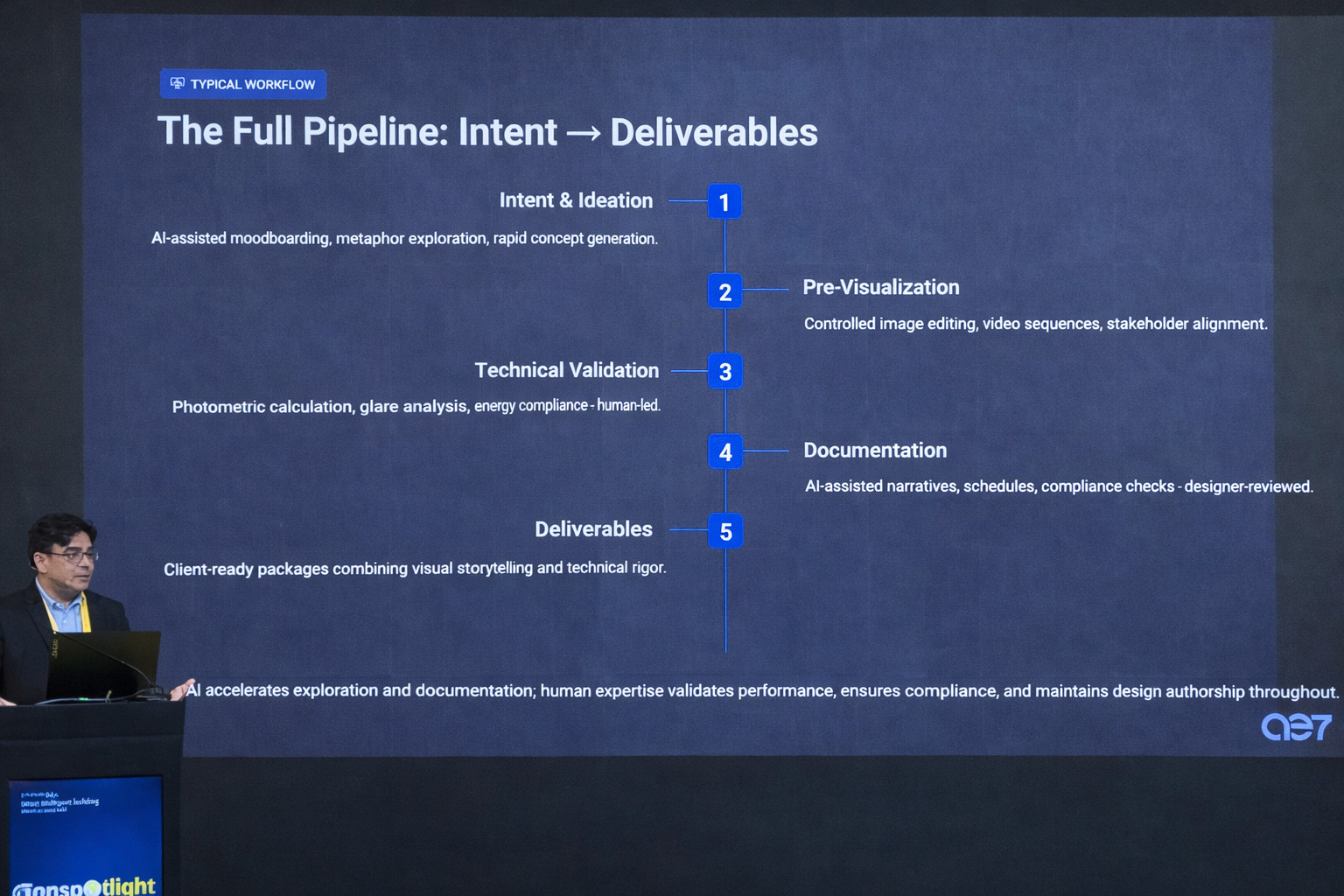
Rather than introducing AI as a collection of disconnected tools, AE7 organizes its use around a repeatable pipeline:
-
Intent & Ideation
Early metaphors, moodboarding, and narrative framing. -
Pre-Visualization
Image editing and video sequences to align stakeholders. -
Technical Validation
Human-led photometrics, glare analysis, and compliance review. -
Documentation
AI-assisted schedules, narratives, and compliance checks. -
Deliverables
Client-ready packages combining visuals and technical rigor.
This structure prevents the most common AI failure mode: impressive images with no path to execution.
Practical Tip: Define the Story Before You Touch a Tool
Izhar stressed that AI should never be asked to “design lighting.” Instead, designers define the emotional target first. Only then does AI help translate that abstract intent into tangible visuals.
At AE7, early prompts include:
-
Spatial typology (hotel, public realm, office)
-
Environmental context (urban, desert, coastal)
-
Desired emotional tone
-
Time of day and contrast intent
-
Material response priorities
This discipline dramatically reduces unusable outputs and keeps exploration focused.
Visual Ideation: Speed Without Randomness
For early concept exploration, AE7 continues to rely on image-generation platforms such as Midjourney, not because they are new, but because they remain controllable. The difference between noise and usable imagery, Izhar explained, comes down to prompting structure.
Rather than chasing novelty, the team uses AI to test restraint—calmness, hierarchy, and balance—before committing to lighting strategies. Outputs are curated, refined, and then translated into real systems.
Image Editing: Changing Light Without Breaking Architecture
One of the most compelling demonstrations showed how AE7 edits lighting conditions while preserving architectural integrity. Using advanced image-editing models, daylight scenes were converted to nighttime conditions through plain-language prompts that specified:
-
Target CCT
-
Contrast levels
-
Highlight control
-
Preservation of material detail
No geometry was altered. No Photoshop layering was required. The result was rapid iteration that stayed believable—and reviewable.
Practical Tip: Watch for Hallucinations
AI will invent luminaires, impossible beam behavior, or physically implausible effects unless constrained. AE7 mitigates this by:
-
Locking geometry
-
Referencing real photometric behavior
-
Avoiding vague aesthetic language
-
Reviewing every output against buildability
Video Generation: Aligning Stakeholders Earlier
Lighting is temporal, yet static images dominate most presentations. AE7 uses AI-assisted video generation to show arrival moments, dimming logic, transitions, and night identity far earlier than traditional workflows allow.
These videos are not final marketing assets. They are design-development tools used to reduce confusion and late-stage redesigns. According to Izhar, showing movement early dramatically improves stakeholder alignment.
Documentation: Where AI Delivers the Biggest Gains
If visualization captures attention, documentation delivers the most measurable ROI. Girgis outlined how AE7 has reduced documentation time by as much as 70 percent through a series of custom AI assistants.
Assistant 1: Concept Narrative Agent
AE7 developed an internal narrative agent trained on the firm’s studio language and design ethos. Designers upload sketches, renders, plans, or photos. The agent:
-
Analyzes geometry and context
-
Generates a first-draft lighting narrative
-
Suggests contrast ratios and strategy
-
Produces execution notes
Designers then refine the output. The agent accelerates writing; it does not replace authorship.
Practical Tip: Train on Your Own Voice
Generic AI produces generic language. AE7’s success came from training agents on past narratives, preferred terminology, and studio values.

AI Provides Significant Labor Savings for Documentation
Assistant 2: Datasheet Digestion
Manufacturer datasheets remain wildly inconsistent. AE7’s specification extractor parses PDFs, identifies key parameters, and standardizes outputs for schedules.
The workflow:
-
Drag and drop PDF datasheets
-
Select configuration options (engine, beam angle, CCT, IP, finish)
-
Export clean, formatted data directly into Excel templates
What once took 2–3 hours now takes 10–15 minutes, with validation.
Assistant 3: Schedule & Project Memory
AE7 created a searchable database of luminaires specified over multiple years of projects. Each entry receives a unique serial number.
Designers can:
-
Filter by project, luminaire type, or use case
-
Reuse proven solutions instantly
-
Auto-populate new schedules by entering a serial number
This turns institutional memory into a practical design tool.
Assistant 4: Compliance Support
For Dark Sky and energy code compliance, AE7 built a browser-based checker generated via AI. Designers select:
-
Lighting zone
-
Project type
-
Measured values
The tool verifies compliance and generates client-ready PDFs explaining how requirements are met.
Tool Selection: Fewer, Cleaner, Measurable
Rather than endorsing specific platforms, the workshop emphasized functional categories:
-
Image generation
-
Image editing
-
Video generation
-
Documentation agents
-
Workflow orchestrators
The guidance was clear:
-
Start with one or two tools
-
Optimize for handoffs and file integrity
-
Measure time savings and iteration reduction
-
Standardize naming, prompts, and versioning
Integrated platforms can simplify workflows, but only if they reduce friction rather than add complexity.
Human Checkpoints Are Non-Negotiable
Throughout the session, Izhar returned to one principle: trust is protected through human checkpoints. Photometrics, glare, maintainability, controls usability, ethics, and authorship are always reviewed by designers.
AI accelerates. Humans decide.
The Bigger Question: Efficiency vs. Employment
An audience question challenged the optimistic framing: if AI makes designers exponentially more productive, doesn’t it reduce the need for people?
Izhar’s response was pragmatic. AI shifts where time is spent. Less time on repetitive documentation means more time on thinking, testing, and refining. The differentiator becomes judgment, not output volume.
Final Takeaways for Lighting Designers
-
Start small and master depth before breadth
-
Use AI to explore, not to decide
-
Protect intent by defining stories first
-
Validate everything against real-world physics
-
Be transparent with clients about AI use
-
Treat governance and ethics as design responsibilities
The tools will keep evolving. Human judgment remains the differentiator.